

NH QuickStart is the online filing and search system run by the New Hampshire Secretary of State. It joins a public business inquiry with the transactional tools that registered entities use across their operating lives. Anyone with a browser can run a search, and no account is required to view the records held by the Corporation Division.
The inquiry accepts a business name or a business ID and returns a grid of matching registrations. Opening a row leads to an entity page carrying identifiers, agent details, and filing history. Signing in unlocks annual reports, formation documents, financing statements, and certificate orders from those same screens, with payment handled inside the session.
What the NH QuickStart business inquiry returns
Typing a name into the NH QuickStart field returns registrations held by the Division. Each row carries the legal name, the numeric business ID, the entity class, and a status marker. Records for dissolved, revoked, and merged entities remain in the list, so historic names stay findable long after a business stops filing reports. A reader who needs a lien record can follow the New Hampshire UCC search page.
When a search returns nothing
An empty result usually means the spelling drifted from the register, the entity organized in another state, or the business never registered at all. Widening the mode to contains, dropping a stray ampersand, or trying the surname of an organizer often recovers a record that exact match skipped over entirely.
NH QuickStart landing page:
https://quickstart.sos.nh.gov/online/Account/LandingPage
The four match modes and what each one returns
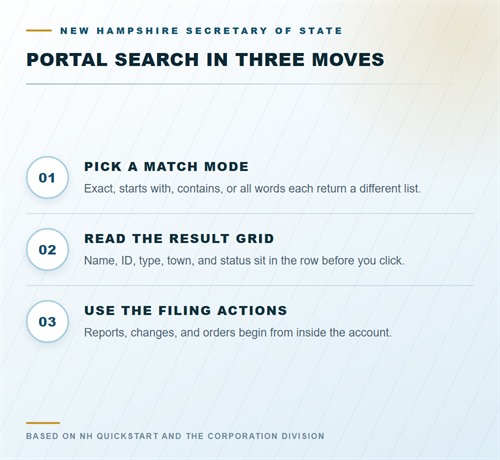
Four modes govern how the system compares your entry against stored names. Exact match demands the full registered string, character for character. Starts with returns names opening with your text. Contains looks for the string anywhere inside a name. All words requires each typed term to appear somewhere in the record, in any sequence.
Narrowing a vague recollection
When only a fragment survives in memory, contains or all words recovers the record fastest. A distinctive syllable, such as the stem of a family surname, often proves enough to shorten a long list. Exact match suits verification work instead, where a name arrives from a contract, a bank form, or a tax notice and confirmation is the goal.
Searching by business ID
Each registration holds a numeric business ID that persists through name amendments. Entering that number with exact match avoids spelling variance altogether. This route helps when several entities trade under similar designations, or when the legal name has changed more than once since formation and the current version is uncertain.
Reading the result grid
Matches appear in a grid rather than a single record card. Column entries let you weigh candidates before opening any of them, which matters when a surname search returns dozens of limited liability companies. The grid supplies the identifiers needed for cross-checking other state records, including the business ID and the agent of record.
Sorting and paging
Long result sets paginate, and column headers reorder rows so that names, identifiers, or status values group together. Tightening the original query usually beats paging through hundreds of lines. Try a starts-with entry on the distinctive term, then widen to contains if the list returns nothing at all.
Status labels
Status values separate active registrations from those dissolved, revoked, or absorbed by merger. The label reflects the Division’s current record rather than your own knowledge of the business. A company may keep trading while its registration lapses, so confirm status before relying on a record for a loan, a lease, or a contract.
Refining with class filters
Class filters split corporations from limited liability companies, trade names, and other registration categories. Pairing a filter with a starts-with entry on the distinctive term produces a short candidate list. Filtering after a broad query is usually the faster sequence, especially when the first term turns out to be far too general for the register.
Inside the entity detail page
Selecting a row opens the page maintained for that registration. Addresses, dates, and identifiers sit at the top, with the registered agent and registered office listed separately from any principal office. The layout stays consistent across classes, so a corporation page and a limited liability company page can be read in the same way.
Agent and office entries
The registered agent accepts service of process on the entity’s behalf. The registered office must be a physical Granite State address where that agent can be reached during business hours. Both fields change whenever an entity files a change of agent, and the page always displays the version recorded most recently.
Filing history and document images
Below the identifying details, the page lists documents the Division has recorded, ordered by date. Formation papers, annual reports, amendments, and merger filings each appear with a type label. Where an image exists, it opens from the page. Where none is stored, the date and type still establish a usable timeline.
Entity class and formation date
The page states the class of registration and the date the Division accepted the formation document. Both details matter for compliance work, since reporting deadlines, suffix requirements, and permitted activities vary by class. A conversion from one class into another generally produces its own entry with separate dates attached to it.
Filing actions inside a registered account
A free account turns the portal from a reading tool into a filing channel. Holders submit annual reports, formation documents, and amendments to previously recorded information. Financing statements under the Uniform Commercial Code travel through the same system, keeping secured lending records beside the entity records they reference. Charges post at checkout against the same login.
Annual report route
Reports fall due in the anniversary month of formation for most classes. The dashboard lists every entity tied to your login with its due date attached. Filing runs through a series of screens, and the entity status refreshes once processing finishes. Receipts stay attached to the entity for later retrieval by anyone holding account access.
UCC statement route
Financing statements follow a separate path with their own fields. A filer enters debtor and secured party details, describes the collateral, and submits electronically. Acknowledgment returns a file number and a date stamp at once, giving a lender a verifiable record without mail delays or a counter visit. Amendments and continuations run along the same path.
Amendments and agent changes
Changes to a registered agent, a principal office, or an entity name are filed as amendments against the existing record rather than as fresh registrations. The business ID survives the process untouched. Filing history shows each amendment in sequence, so a reader can see exactly when responsibility for accepting service of process shifted to another party.
Ordering certificates and filed copies
Certificates of good standing and certified copies are ordered online rather than by post. A good standing certificate states that the entity is current on its reports and fees. A certified copy carries the text of a filed paper with the Division’s stamp on it. Banks, landlords, and out-of-state licensing boards request one or the other with some regularity.
Good standing orders
The order draws on the record at the moment of processing, so a pending annual report surfaces as a delinquency and blocks a clean certificate. Filing the overdue report first, then ordering, avoids a second request and a second charge. The finished certificate states the entity name and status plainly.
Certified copies and expediting
A certified copy bills per page on top of the base charge, so a long agreement costs more than a single-page certificate. Expedited handling adds a flat amount and moves the request ahead of routine work. Neither option alters the underlying record; each simply delivers a document sooner than the standard queue allows.
UCC search requests
The Division also searches its financing statement index and returns the findings with a certificate. Ordering one through the portal replaces a written request and a mailed reply, and the result lists every filing that names the debtor, including credit arrangements the company may never have disclosed to its own officers.
Receipts, payment, and handling charges
Every completed transaction generates a receipt inside the account, ready for printing or download. The receipt separates the statutory fee from the handling charge and shows the payment method used. Card payments and portal credits both record cleanly, which keeps bookkeeping tidy at quarter end and simplifies a reimbursement request from a client.
Why online totals run higher
Electronic payment carries a handling charge added to the statutory amount under RSA 5:10-a. The surcharge applies per transaction rather than per document, so bundling related filings into one checkout trims the total. Paper submissions avoid the surcharge but surrender the immediate acknowledgment that an electronic filing provides.
Retention in the account
Receipts remain available after the session ends, tied to the entity rather than to a browser window. Downloading copies at the time of filing protects against later access changes or a lapse in account permissions. A receipt paired with the recorded document makes a complete evidentiary package for auditors, lenders, or counsel.
Paying at checkout
Checkout accepts card payment and applies the handling charge at the point of sale. The account keeps a running record of every charge, which helps when a client asks for a breakdown of filing expenses months afterward. Paper filers instead receive a stamped acknowledgment from the counter or through the mail, with no digital ledger behind it.
Fees for portal transactions
Amounts below pair the counter price with the online total that includes the handling charge. Certified copies add a per-page amount on both channels. Expedited service is a flat addition rather than a replacement fee, available to requests whether they arrive through the portal or in person at the Concord office.
| Item | Paper | Online |
|---|---|---|
| Standing certificate | $5 | $7 |
| Certified copy, base charge | $5 | $5 |
| Certified copy, per page | $1 | $1 |
| Expedited service | $25 | $27 |
| Reservation, Form 1 | $15 | $17 |
| Reservation, investment trust | $30 | $32 |
| Trade name filing, TN-1 | $50 | $52 |
| Trade name renewal, TN-1 | $50 | $52 |
Beginning a new entity through the portal
Formation starts with the same inquiry screen that researchers use. Confirming that a proposed name clears the register comes first, because a formation document submitted under a taken name is returned unprocessed. Once the name clears, the filing screens collect organizers, agent details, and the principal office address before reaching payment.
Name checks before submission
The inquiry compares your entry against every registration in the state, including trade names and reserved names. A clean result does not guarantee acceptance, since the Division also applies suffix rules and consent requirements for regulated vocabulary. Clearing both tests before filing spares the cost and delay of a returned submission.
Confirmation after filing
Accepted filings return a confirmation carrying the business ID assigned to the new entity. That number keys every later transaction, from the first annual report through a final dissolution. Recording it beside the entity’s tax registrations keeps future searches short and prevents pulling the wrong record from a crowded result grid.
Dissolution and withdrawal filings
Ending a registration takes its own filing rather than a lapse in reporting. Articles of dissolution for a corporation, or the comparable certificate for a limited liability company, close the record and end the annual obligation. A foreign entity instead files a withdrawal when it stops doing business within the state’s borders.
Where the portal record stops
The inquiry reports what the Corporation Division maintains and nothing past that boundary. Tax standing with the Department of Revenue Administration, occupational licenses, and federal employer numbers live in other systems entirely. Financial statements are never filed here. Researchers needing those items approach the relevant agency separately, using the business ID as the linking reference.
Session limits and repeat work
Public searches run without a login, but sessions expire after inactivity and long result sets may need rebuilding. Keeping the business ID in your notes shortens a second attempt considerably. Signed-in sessions last longer and preserve prior filings, which helps during a day spent handling several entities at one sitting.
Records outside the Division
Licensing boards, municipal clerks, and the revenue department each hold data the portal never collects. A contractor registration, a local food permit, or a meals license will not surface in a business inquiry. Treat the portal as the corporate record and approach each additional agency for whatever file it keeps on the same business.
Where portal results connect
A business ID taken from the grid opens other record collections on this site. Ownership papers and formation history appear in the LLC records pages, while officer chains and corporate filings sit under corporation records. Both trace back to the identifier the Division issues, which keeps cross-referencing steady when names have shifted over time.
Trade names inside the grid
Trade names appear in the same result list as legal entities, marked with their own class label. A designation registered by a sole proprietor sits beside limited liability companies and corporations. For brand research, one query therefore surfaces both the operating name and the legal person standing behind it.
Comparing an entity across sources
Matching the Division’s record against local licenses or court papers works best when you carry the business ID into each search. Frequent surnames make text matching unreliable, and successive name changes compound the problem. The numeric key stays fixed through all of it, including mergers and conversions between entity classes.
Building a research trail
Saving the business ID, the name exactly as recorded, and the date of each lookup makes later verification straightforward. Records shift as amendments process, so a note of when a status was observed settles disputes that might otherwise turn on memory. Screenshots of the result grid add a second layer of support for a written report. The New Hampshire business records page covers the documents a portal order returns.
Frequently Asked Questions
Researchers bring similar questions about the inquiry screen, the account tools, and the charges that appear at checkout. Some ask about access, others about what a filing costs or which documents the system will accept. The answers below address the points that arise most often in day-to-day use of the system.
Do I need an account to look up a business?
No. The inquiry is open to anyone with a browser, and no fee or registration applies. An account becomes necessary only when you file documents, order certificates, or want receipts retained under your own login.
How do the four match modes differ?
Exact match requires the full registered name. Starts with matches name openings, contains matches an internal string, and all words requires every typed term to appear somewhere in the record, whatever order you enter them.
Can a search use a business ID rather than a name?
Yes. The field accepts either a business name or a business ID. The numeric ID is the sturdier route, since it survives amendments and avoids confusion between separate entities that chose similar names.
Which filings can be submitted online?
Annual reports, formation papers, amendments and other changes, UCC financing statements, and orders for certificates of good standing and UCC searches all run through the portal once you sign in.
Why does the online total exceed the printed fee?
A card payment includes the statutory handling amount under RSA 5:10-a. That amount is charged once per transaction, and the checkout receipt lists it on its own line.
Do dissolved companies stay in the database?
Yes. Records for dissolved, revoked, and merged entities remain available. Their status labels distinguish them from active registrations, and their filing histories stay intact, which supports research into ownership and litigation history.